Catalonia's openEHR CDR for 8 Million People
Catalonia wanted an openEHR Clinical Data Repository for 8 million people. Medblocks worked with IBM and vitagroup to design the sync layer for hospitals.
December 4, 2025
Six months ago, Couchbase approached us to build a FHIR server on top of their NoSQL database.
Most NoSQL databases scale well horizontally and let you store JSON however you want. But when you need to run complex queries and ensure transactional integrity, NoSQL falls short of its SQL counterparts.
This is especially true when you have to store and query data from different collections (the equivalent of tables in SQL).
So, could we really implement all the FHIR search capabilities, transactional inserts, and custom profiling on top of a NoSQL database?
To our surprise, we were able to implement ALL the requirements of a standard, fully-fledged FHIR server using Couchbase’s SQL++ query language, Full Text Search, and key-value operations.
The FHIR server we built is ready for use and is open-source under the Apache 2.0 license. You can find it on Couchbase Labs’ GitHub here: https://github.com/couchbaselabs/couchbase-fhir-ce
You can deploy it anywhere: self-hosted on Couchbase Server for complete control over your infrastructure, or on Couchbase Capella, their fully-managed cloud platform. The documentation here will help you get started.
We also have a technical walkthrough video for you to follow along.
If you need help getting started or want to discuss your specific use case, reach out to us. We’d love to hear from you.
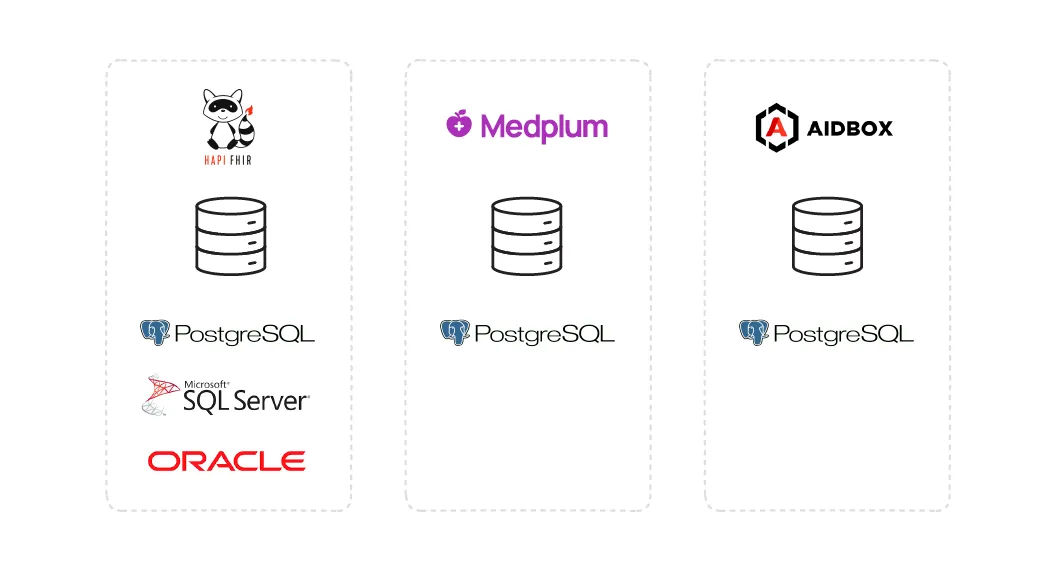
The FHIR ecosystem today is dominated by SQL databases. Nearly every major open-source FHIR server implementation has been built on top of relational databases (mostly PostgreSQL).
HAPI FHIR currently supports PostgreSQL, MS SQL Server, and Oracle. Medplum and Aidbox also leverage PostgreSQL.
There are several FHIR servers that are built on top of NoSQL databases, some of which have been more successful than others.
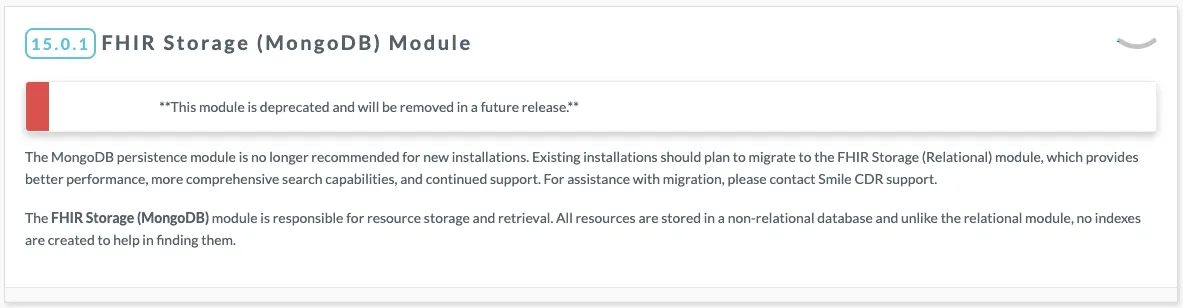
The first one that comes to mind is SmileCDR’s FHIR Storage (MongoDB) Module, launched in 2020. It was deprecated within five years and is no longer recommended for new installations.
SmileCDR now actively discourages new implementations from using MongoDB and encourages existing deployments to migrate to their FHIR Storage (Relational) Module, citing better performance and more comprehensive search capabilities.
MongoDB has partnered with Exafluence to deliver a FHIR API for MongoDB solution built on MongoDB Atlas.
Their solution offers real-time and batch data ingestion using Confluent Kafka and Spark, with deployment options across multi-cloud environments or on-premises infrastructure.
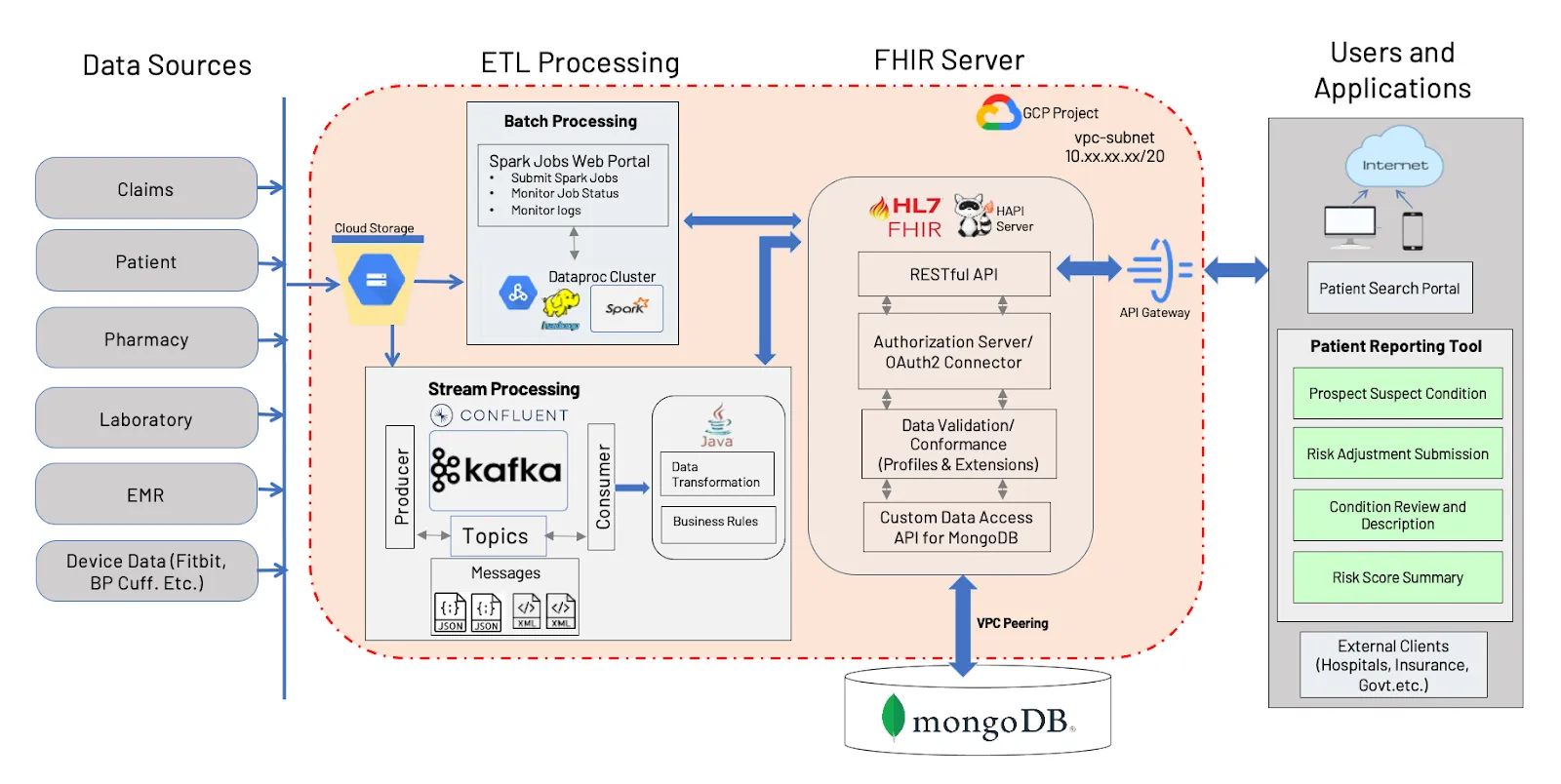
It maintains native FHIR format preservation by leveraging MongoDB’s JSON-based document model, supporting 12 FHIR resource types today. And they use HAPI FHIR to finally serve the API layer.
However, the whole solution is proprietary and not available to the public. The ETL steps are complex and require a lot of infrastructure to actually host. And yes, they support only 12 resources.
Microsoft’s Azure Health Data Services offers a managed FHIR server based on their open-source .NET implementation. While you can self-deploy it, it is tightly integrated with Azure’s ecosystem - Cosmos DB, Entra ID, and other Azure services are required to handle storage, security, and other day-to-day operations.
This makes it convenient for Azure customers but creates vendor lock-in with extremely complex cross-cloud deployment options.
Before we go any further, let’s address the question: Why are people even building FHIR servers right now?
The adoption of FHIR has increased significantly over the years. In the 2025 State of HL7 FHIR Survey Results published in May 2025, it is reported that 39 out of 72 respondents expected a strong increase in FHIR Adoption in their country. And 28 respondents expected an increase in their respective countries.
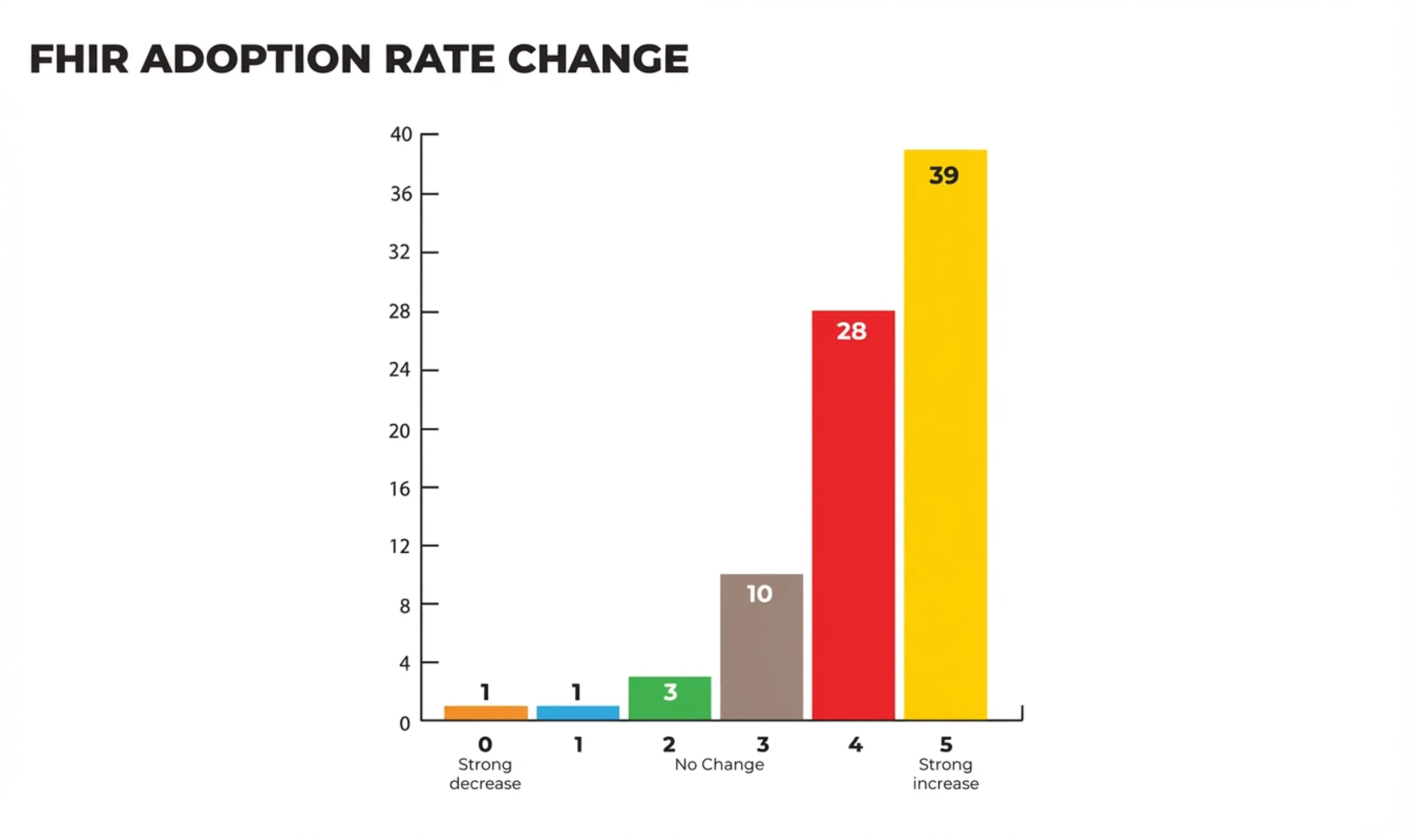
There are many reasons behind the rise of FHIR adoption. Let’s take a look at the biggest driving factors: regulatory mandates & the FHIR app ecosystem
Two major US regulations have made FHIR implementation mandatory for large segments of the healthcare industry.
As a result, organizations need production-ready FHIR infrastructure, and they need it now!
Major EHR vendors like Epic have responded to these regulations by providing FHIR APIs, but their approach is compliance-focused rather than capability-focused.
Epic, for example, uses a FHIR facade that exposes a limited set of read-only APIs, primarily designed to satisfy regulatory requirements. This allows patients and third-party apps to retrieve specific data, which technically complies with the law.
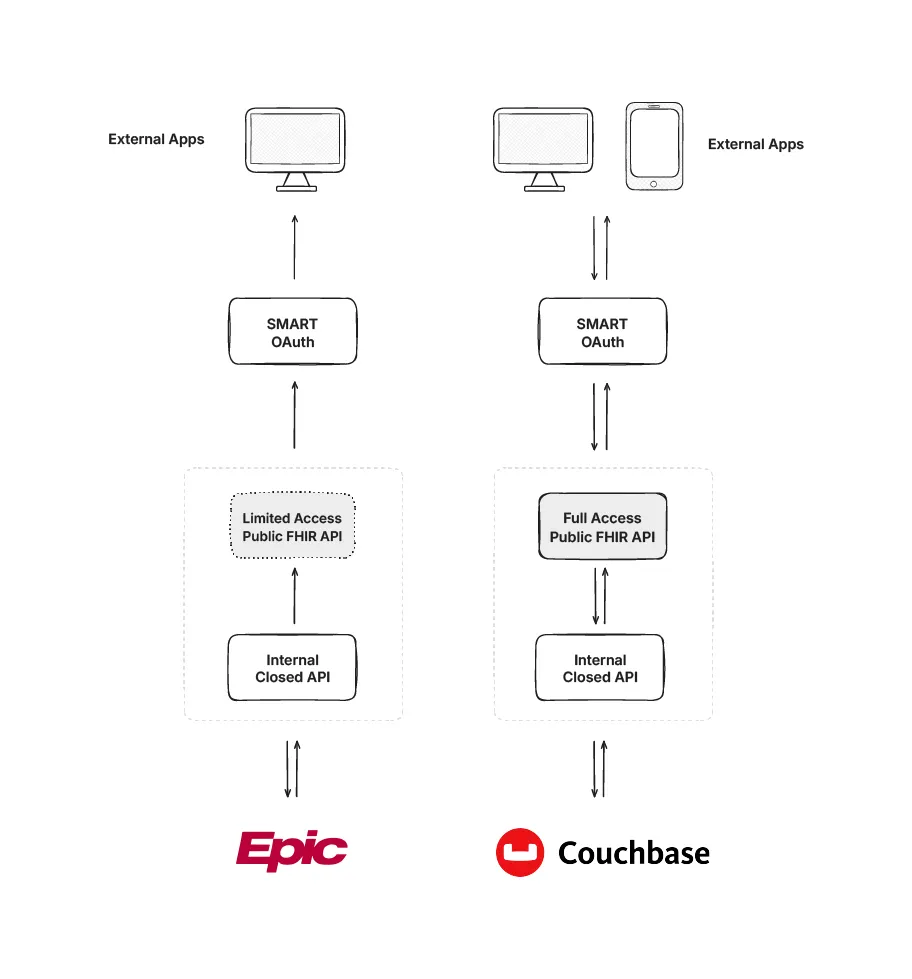
This compliance-focused approach creates a gap in the market. Healthcare organizations building their own applications, payers managing member data, research institutions analyzing health information, and startups developing innovative health tech solutions need more than basic read access.
They need full FHIR servers that support the complete specification: create, read, update, delete, search operations, transaction bundles, and custom extensions. They need infrastructure they can control, modify, and scale according to their specific requirements.
Aside from regulations, there is also access to the app ecosystem that you get by adopting FHIR.
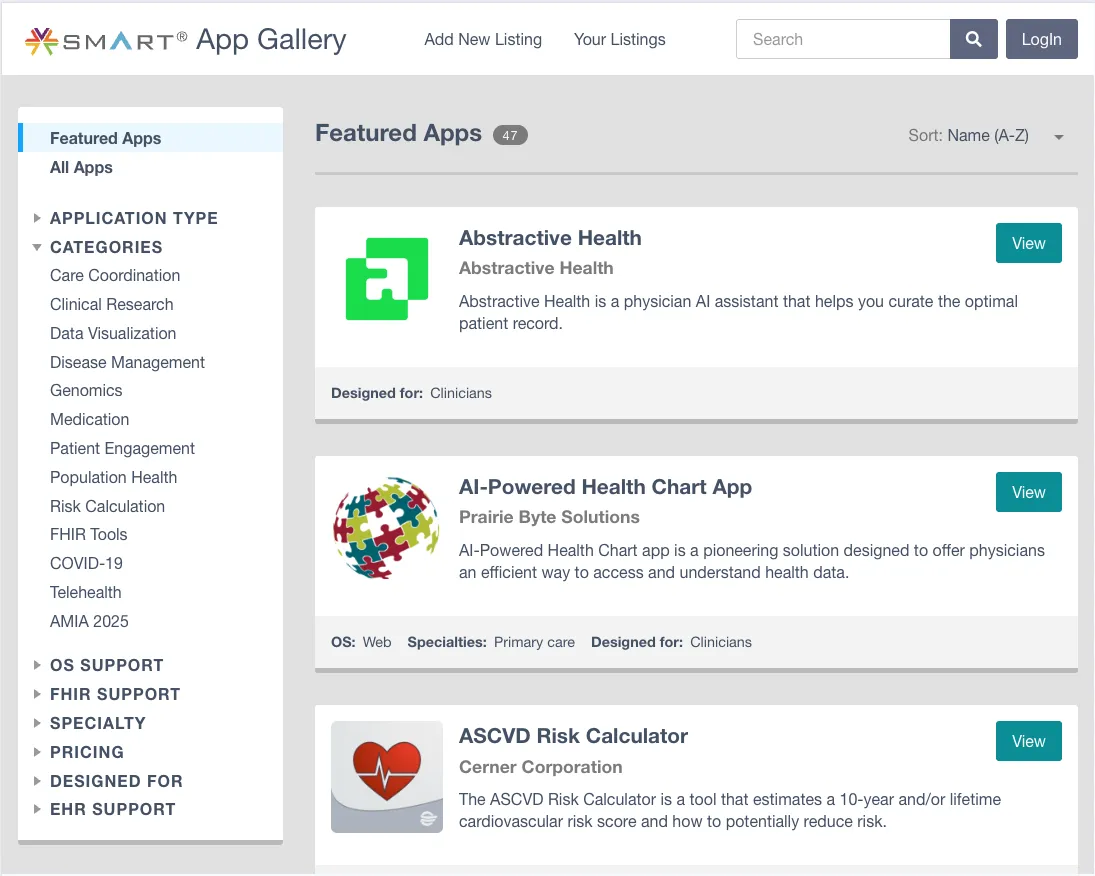
The SMART App Gallery is a public catalog of both commercial and open-source apps that work with any FHIR-compliant system using SMART on FHIR. Organisations can deploy pre-built patient portals, clinical decision support, and analytics dashboards with minimal setup.
With this industry landscape in mind, let’s look at the role that Couchbase plays here.
Couchbase already has a presence in Health IT. According to their Health Business Brief, their clientele includes more than 30% of the Fortune 100 including companies like Becton Dickinson, Everyday Health and Cochlear.
When they first approached us, we knew building a FHIR server on NoSQL wouldn’t be easy. Turns out, it was harder than we thought.
FHIR was designed with SQL databases in mind. Things like search parameters and chained queries work naturally with SQL’s table relationships. But with Couchbase’s document-based approach, we had to rethink everything - how data is stored, indexed, and queried.
In this process, we faced many challenges:
The first question was: where do we begin?
Building a FHIR server from scratch would mean implementing hundreds of resource types, search parameters, validation logic, and all the edge cases in the FHIR specification. That’s years of work.
So, we evaluated several existing FHIR server implementations to see if we could adapt one to work with Couchbase.
Firely Server (formerly known as Vonk) is a .NET-based FHIR server with a plugin architecture. While extensible, it’s also built around relational database assumptions and would require significant refactoring.
Medplum is a modern TypeScript-based FHIR platform. But it’s deeply integrated with PostgreSQL and designed as a complete platform rather than a standalone server we could adapt.
Protobuf-based approaches offered serialization but didn’t solve the core problem of mapping FHIR’s relational query semantics to a document database.
HAPI FHIR stood out because of its architecture. It’s the most mature and widely adopted Java-based FHIR server, and the reference implementation powering many production systems.
What makes it special is its clean architecture: the storage and validation layers are completely separate. HAPI handles all the FHIR parsing, validation, and conformance logic, while the persistence layer is fully pluggable.
This separation allowed us to integrate Couchbase as the storage backend. We could leverage HAPI’s FHIR logic while building our own persistence layer optimized for Couchbase’s document model.
With HAPI FHIR as our foundation, the next challenge was indexing. This required understanding how Couchbase’s indexing fundamentally differs from relational databases.
Couchbase uses Global Secondary Indexes (GSI) that live in a separate, distributed Index Service, distinct from the Data Service that stores JSON documents. When data changes, the Database Change Protocol (DCP) streams updates to the indexer, which maintains B-tree indexes stored in Plasma (Couchbase’s modern storage engine).
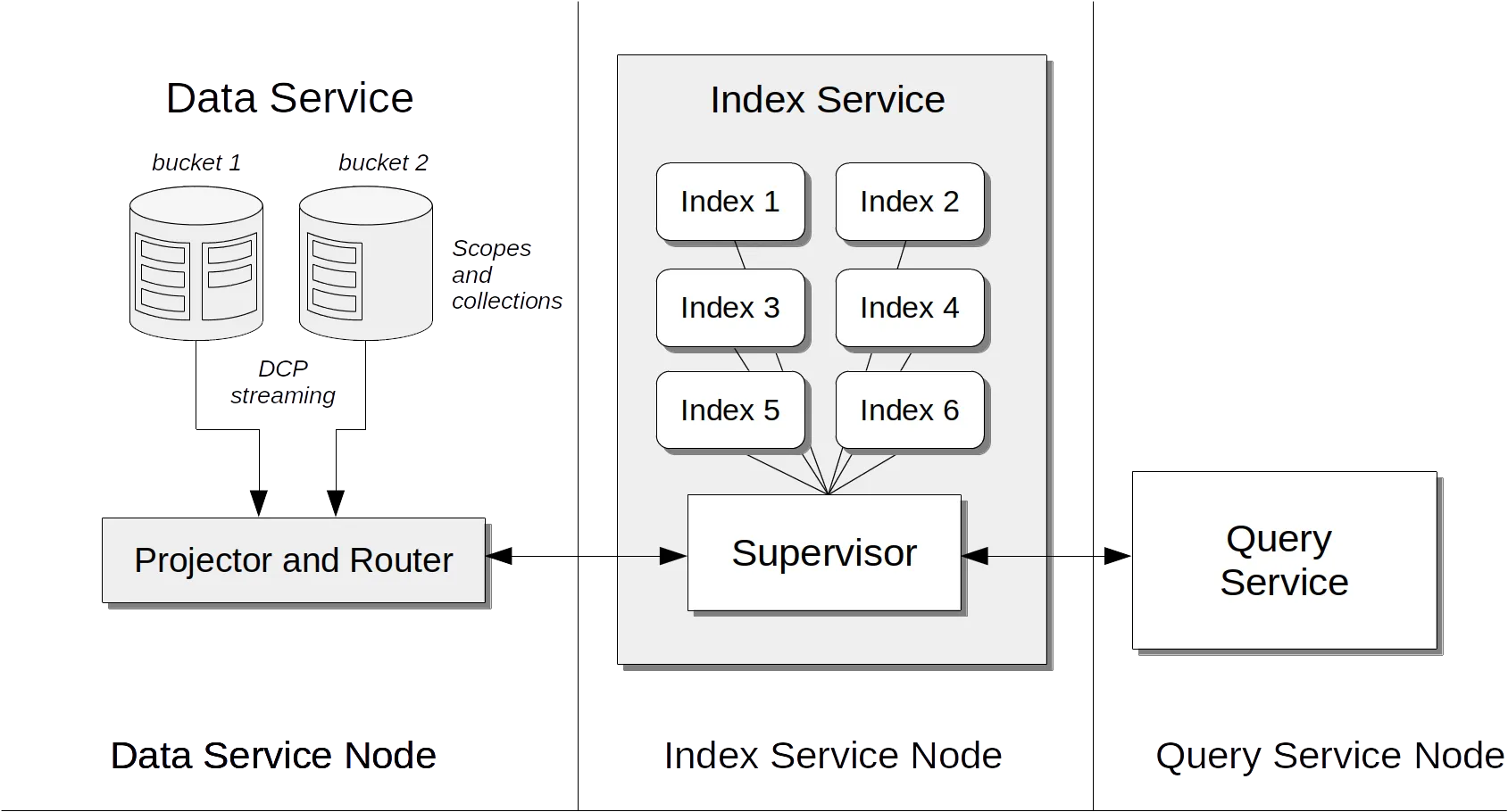
When you query with SQL++, the Query Service uses the Index Service to fetch document IDs, then retrieves the full documents from the Data Service. If your query can be satisfied purely from index data, called a covered index. Couchbase skips the document fetch entirely, thereby improving performance.
This separation allows independent scaling of indexing and data storage. You can add Index Service nodes to handle more queries without touching your data nodes. This architectural choice would prove critical for FHIR.
FHIR search is powerful but also demanding. A single resource type like Observation can have 20-50 searchable parameters: code, subject, date, performer, value, category, and more. Patients can be searched by name, birthdate, identifier, gender. And that’s before we consider chained searches like Observation?subject.name=John.
Traditional FHIR servers flatten JSON into relational columns and project search terms into separate indexes, creating duplication and synchronization overhead. We needed a better approach.
We chose Full Text Search (FTS) as the primary search engine, backed by Key-Value (KV) lookups for retrieval. This hybrid design enables efficient search capabilities across millions of documents, with full support for FHIR search parameters: string, token, date, reference, and number.
Each collection (Patient, Observation, etc.) has a dedicated FTS index tuned for its resource type. FTS handles complex queries natively:
A query like Find active Observations for Patient/123 with code=loinc|1234-5 between two dates becomes a single FTS query.
The architecture separates concerns elegantly:
This separation lets FTS handle query semantics while KV ensures fast, consistent reads. For pagination, subsequent pages reuse the cached keyset, no repeated FTS cost.
Traditional RDBMS-based FHIR servers store JSON in columns and project search terms into relational indexes, creating duplication. Couchbase FHIR CE indexes directly on JSON, which ensures no flattening, no loss of fidelity, and a single source of truth.
One tricky issue we encountered was the ambiguous specification around _include and _revinclude operations in FHIR.
The _count parameter controls pagination for search results, it tells the server how many matching resources to return. Sounds simple enough.
But here’s where it gets messy: _count only paginates resources that match the search query. When you use _include to pull in related resources, those aren’t paginated at all. HAPI FHIR’s JPA implementation returns everything related, no matter how many resources that is.
This creates a massive performance problem. Consider a query like Patient?_include=Patient:observation&_count=10. You’d get 10 patients (as expected), but if each patient has thousands of observations, you’re suddenly returning hundreds of thousands, or even millions of resources in a single response.
As your FHIR server grows, these _include and _revinclude queries balloon without any way to control them.
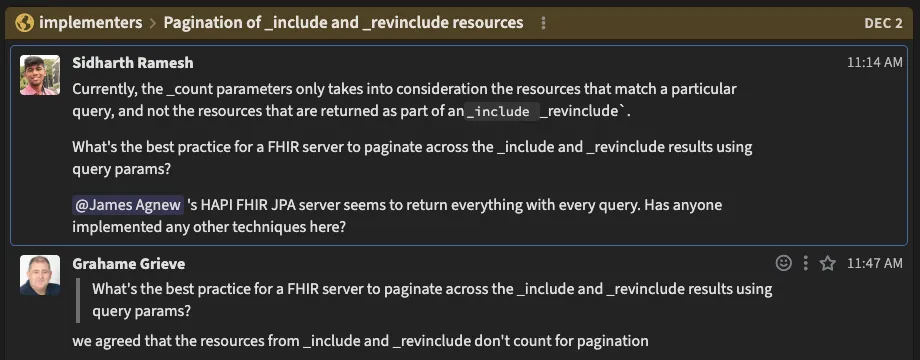
We’re working with the FHIR community to clarify how this should actually work. For now, we’ve implemented a configurable cap on the number of included resources to prevent runaway queries.
After working through these challenges, we arrived at an architecture that handles FHIR’s complexity while scaling with Couchbase’s document model. Every component was designed with these constraints in mind. Let’s break down how it works.
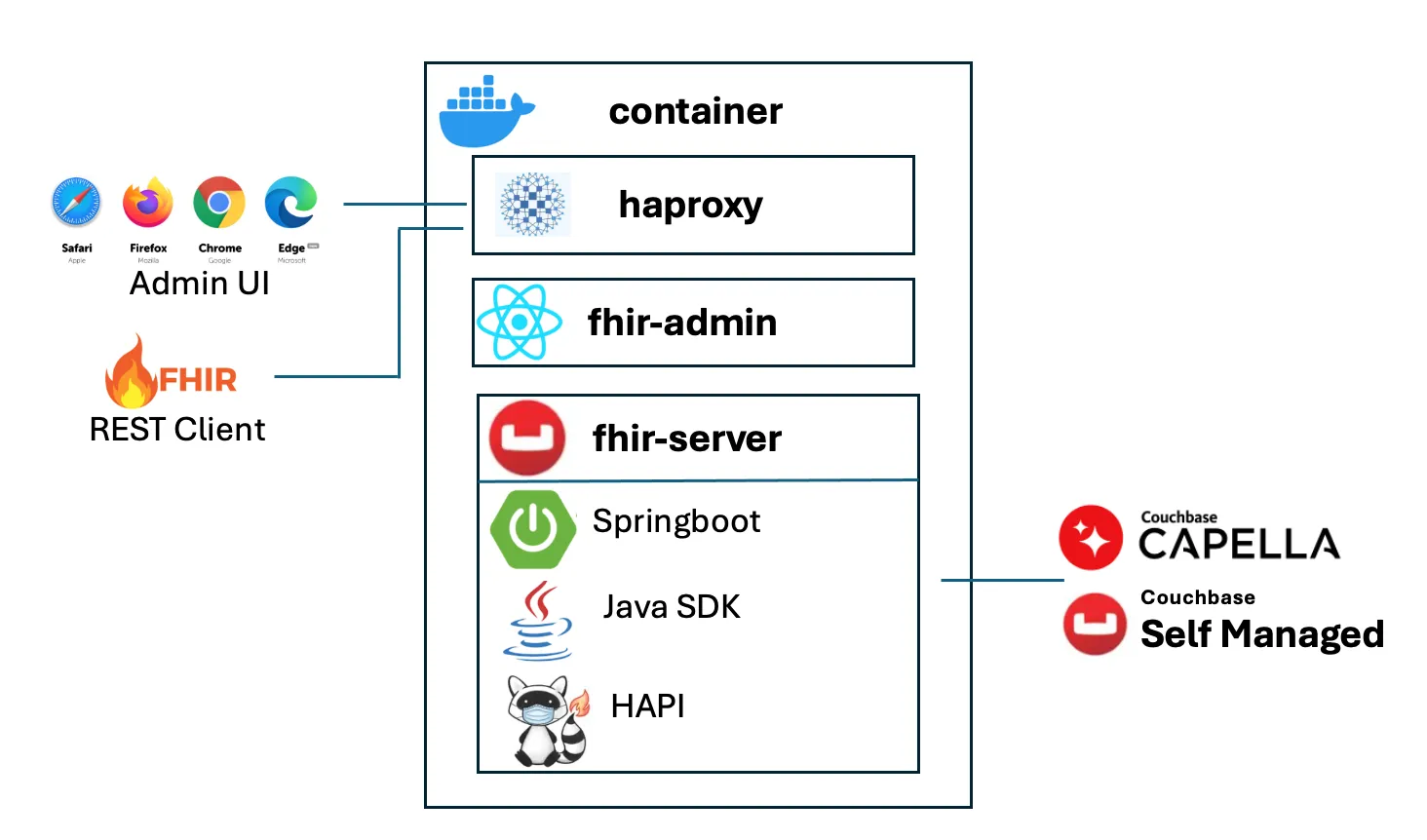
The platform consists of three primary services running in a containerized environment:
HAProxy sits at the entry point, handling all incoming traffic. It routes admin UI requests to the management interface and FHIR API calls to the server, providing TLS termination and load balancing capabilities as the deployment scales.
FHIR admin UI is a React-based management interface accessible from any modern browser. It provides configuration tools, connection management, health monitoring, and utilities for provisioning buckets and indexes. This gives administrators and developers a clear view into the server’s operation without command-line access.
FHIR server is where the heavy lifting happens. Built on Spring Boot, it integrates HAPI FHIR as its core engine with a custom persistence layer that connects to Couchbase. The Couchbase Java SDK handles cluster connections and data operations, while HAPI FHIR implements the REST API, resource validation, and FHIR conformance logic. Our custom storage layer translates FHIR operations into Couchbase queries, bridging the gap between FHIR’s relational semantics and Couchbase’s document model.
FHIR clients, whether mobile apps, EHR systems, SMART on FHIR applications, or testing tools like Postman, make standard FHIR REST calls. HAProxy routes these to the FHIR server, which validates requests, executes queries against Couchbase using FTS and KV operations, and returns properly formatted FHIR responses.
The separation of concerns is clean: HAProxy handles routing, the Admin UI provides management, HAPI FHIR ensures FHIR compliance, and Couchbase delivers scalable, distributed storage and search. Each component does what it does best.
Now, let’s walk through setting up the Couchbase FHIR server locally. We’ll use Docker to run both Couchbase Server and Couchbase FHIR CE, giving you a complete working environment in minutes.
For this tutorial, you will need to have Docker and Postman installed on your system, and also an IDE or code editor like VsCode.
First, we’ll run this Docker command on our terminal
docker run -d --name couchbase -p 8091-8096:8091-8096 -p 11210-11211:11210-11211 couchbaseThis command will take a few minutes. This will install and run the Couchbase Docker container in our system. After this, we open any browser and head to http://localhost:8091. We will see a page like the one shown below:
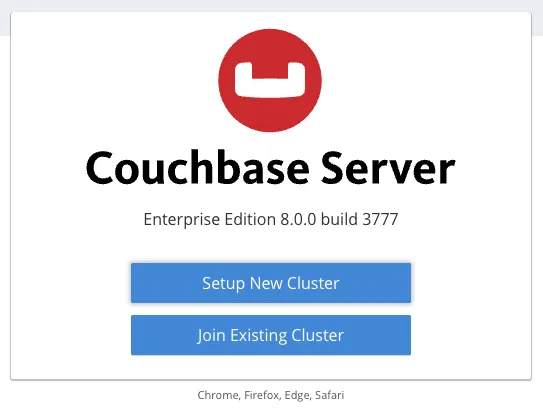
This is the Couchbase server admin where we’re going to create a cluster and a
Bucket and convert it to a FHIR server. To create a cluster, just click on the Setup New Cluster button, and you’ll come across this form
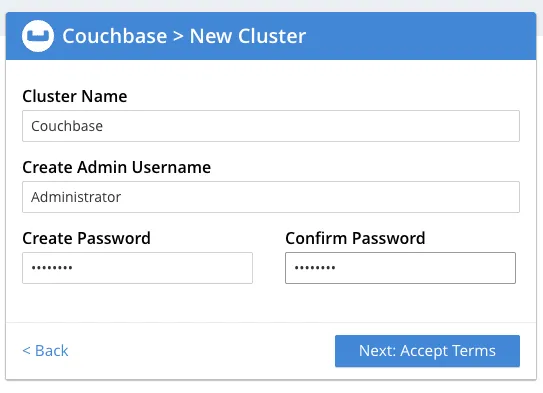
Insert any name and password for the cluster. Make sure you remember the password, as we’ll be using it later.
Once you click on Next, you’ll be taken to the terms and conditions page, where you need to accept and click on Configure Disk, Memory, Services, which will take you to the next step, where you have to configure your cluster and assign memory quotas.
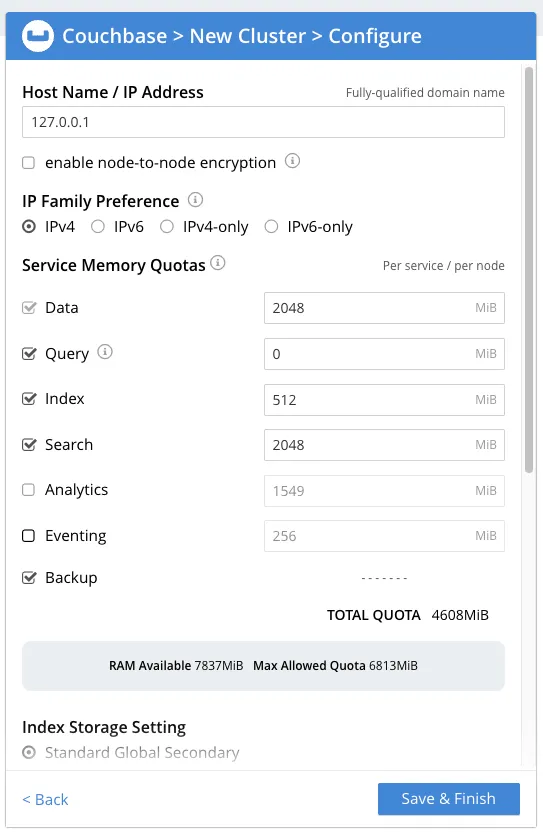
Assign 2048 MB to Data and Search, and disable Analytics and Eventing. Then, click on Save and Finish.
Now your cluster is ready, and you’ll be taken to the dashboard. You’ll see a Buckets option on the Left Sidebar. Click on it, and you’ll see an Add Bucket option on the top-right of the header.
Once you click on Add Bucket, you’ll see an Add data Bucket form where you’ll have to enter the Bucket name. For this tutorial, let’s set the name as fhir. Use a simple name, as this will be used in the FHIR Server URL.
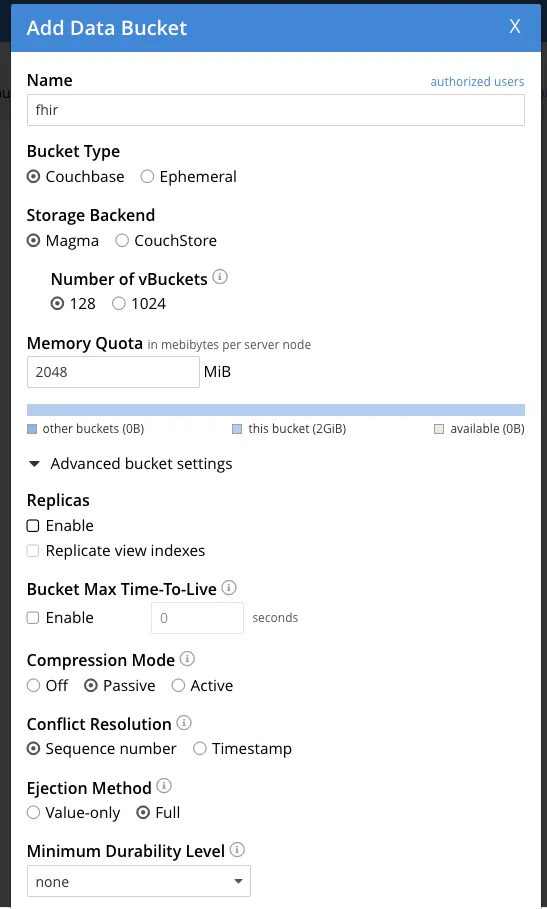
In the Advanced bucket settings, you will see an Enable Replica, which is enabled by default. Disable it and then create the bucket.
Once that’s done, the bucket should be created, and our Couchbase server is ready.
After we’ve set up the Couchbase Server, we’ll now have to clone the couchbase-fhir-ce git repository. Run this command in your terminal to clone the repository
git clone https://github.com/couchbaselabs/couchbase-fhir-ce.gitAfter you have cloned the repo, run the following command to move inside the project folder
cd couchbase-fhir-ceYou’ll see a config.yaml.template file in the project folder, we need to copy that and create a config.yaml file from the template file using this command
cp config.yaml.template config.yamlThis will create a config.yaml file in your project folder.
In the config.yaml file, we need to understand a few things:
connectionString: This represents the link to the Couchbase server where the FHIR server exists. It can be a link to the Capella or the AWS instance if it’s hosted there. By default, it’s localhost, but we will be using host.docker.internal as we’re using the local Couchbase Server running on Docker.username: This is the user name that we used initially while creating the Cluster.password: This is the password we used while creating the cluster.serverType: This has two possible values: Capella if the server is hosted on Capella, and Server if it’s hosted anywhere else. For our case, it is ServersslEnabled: This will be false as we’re running locally. If we were running the server in a hosted environment, then we would keep this as true.Now that our config.yaml file is ready, we are ready to start our Couchbase FHIR Admin using this Docker command
docker-compose upOnce this command is successful, it means that your Couchbase FHIR Admin is ready to launch, and you can view it on http://localhost. It should look like the image below
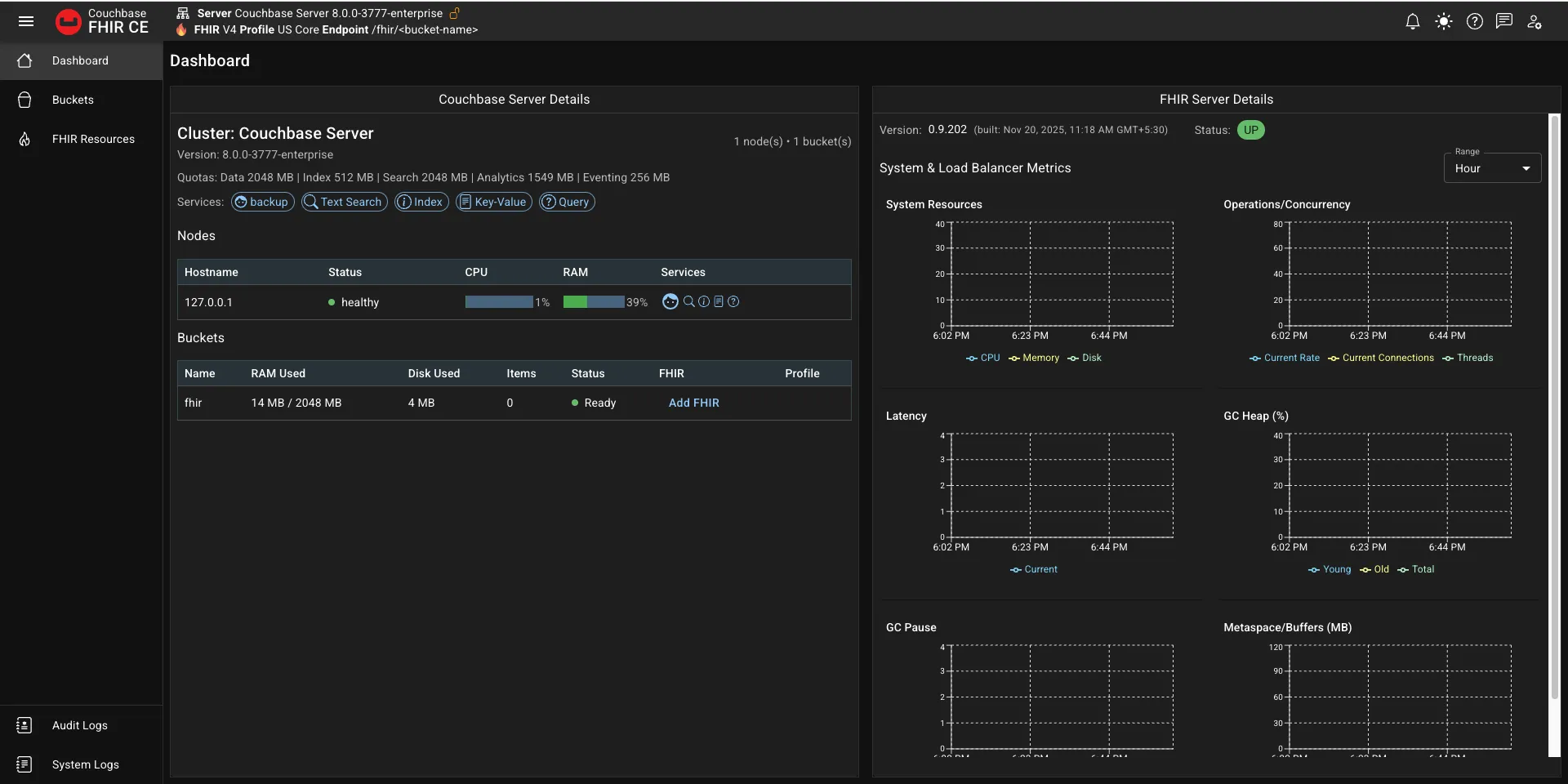
Once you’re in the dashboard, in the Bucket Details section, under Buckets, you should see the name of your bucket with an option Add FHIR.
What that means is that your bucket is ready, but now you need to convert it into a FHIR server before you can use it.
Click on the Add FHIR option, and it will show you this dialog
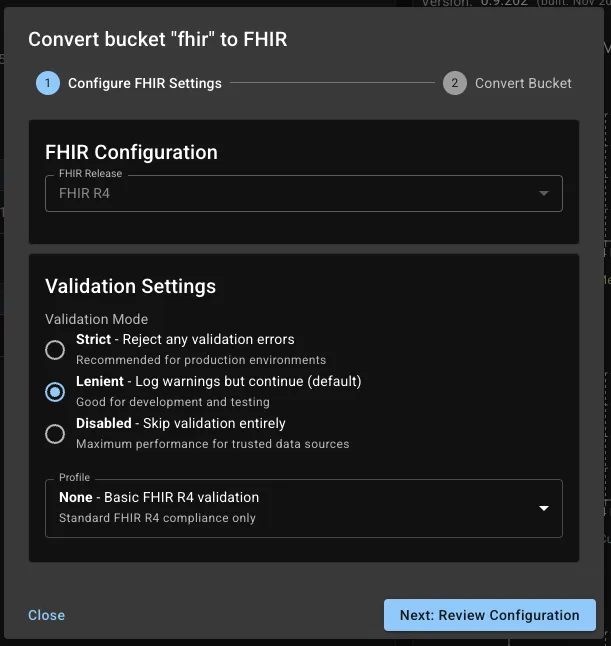
You can set your FHIR server to enforce the US Core Profiles, and then click on Next, and then in the next screen, you can click on Convert to FHIR.
And with this, your FHIR server is ready.
Open a new tab in the browser and go to this link http://localhost/fhir/fhir/Patient to see if you get a FHIR response with no patients.
Now that we have our FHIR server ready, let’s see if we can create a patient.
So we’ll open Postman and make a POST request on http://localhost/fhir/fhir/Patient with the given payload
{
  "resourceType": "Patient",
  "meta": {
    "profile": [
      "http://hl7.org/fhir/us/core/StructureDefinition/us-core-patient"
    ]
  },
  "identifier": [
    {
      "system": "http://hospital.example.org/mrn",
      "value": "123456",
      "type": {
        "coding": [
          {
            "system": "http://terminology.hl7.org/CodeSystem/v2-0203",
            "code": "MR",
            "display": "Medical Record Number"
          }
        ]
      }
    }
  ],
  "name": [
    {
      "use": "official",
      "family": "Doe",
      "given": ["John"]
    }
  ],
  "telecom": [
    {
      "system": "phone",
      "value": "555-555-1234",
      "use": "mobile"
    }
  ],
  "gender": "male",
  "birthDate": "1985-03-15",
  "address": [
    {
      "use": "home",
      "line": ["123 Main Street"],
      "city": "Springfield",
      "state": "MA",
      "postalCode": "01103",
      "country": "USA"
    }
  ]
}
This is dummy patient data that we’ll post to the FHIR server. Click on Send, and you should see a 201 Created response.
After this, let’s do a GET request on the same URL http://localhost/fhir/fhir/Patient, and we should see the recently inserted Patient in the response.
And with that, our setup tutorial is complete! Now you have a fully fledged FHIR Server hosted in a local instance.
Building a production-ready FHIR server on Couchbase is just the beginning. We have a roadmap of features and capabilities that will make the platform even more powerful for healthcare organizations.
SMART on FHIR is the standard way apps connect to healthcare systems using secure OAuth access. When Couchbase FHIR CE supports SMART on FHIR, it can work with many third-party apps, patient portals, and decision-support tools. This lets healthcare organizations plug into the large SMART app ecosystem without needing custom integrations.
Right now, Couchbase FHIR CE supports FHIR R4 with US Core profiles. But the true advantage of FHIR comes from Implementation Guides (IGs) that define how FHIR should be used in specific contexts, whether it’s international patient summaries, clinical genomics, bulk data export, or country-specific extensions. We’re working toward supporting all major IGs, making the server adaptable to any healthcare domain or regulatory requirement.
Healthcare organizations increasingly need to serve multiple clients, departments, or regions from a single infrastructure. We’re working to build multi-tenancy support with tenant isolation, separate data buckets, and granular access controls on Couchbase FHIR CE.
Couchbase FHIR CE is open source, and we welcome contributions. Whether you’re fixing bugs, adding features, improving documentation, or sharing feedback from your deployments, there’s room for everyone to help us shape the future of FHIR on NoSQL.
Check out the GitHub repository, join the discussions, and let’s build better healthcare infrastructure together. If you want to talk to us, we’re always happy to hear from you.
Catalonia wanted an openEHR Clinical Data Repository for 8 million people. Medblocks worked with IBM and vitagroup to design the sync layer for hospitals.
A 'facade' could solve your legacy data's FHIR-compatibility woes. This tutorial shows how to create a FHIR Facade on a Postgres database using Python.

In this beginner-friendly tutorial, learn to create a FHIR Resource using Python. Use the fhir.resources package to create and validate a Patient.
No comments yet. Be the first to comment!